

Your bet slip says “pending”, the bowler is already running in, and your phone shows one bar of signal. By the time the app reconnects, the price has moved and the over is gone. Most problems with mobile online betting come down to the phone, not the market. Mobile betting sites and live betting apps can only be as quick as the connection, battery and settings they run on.
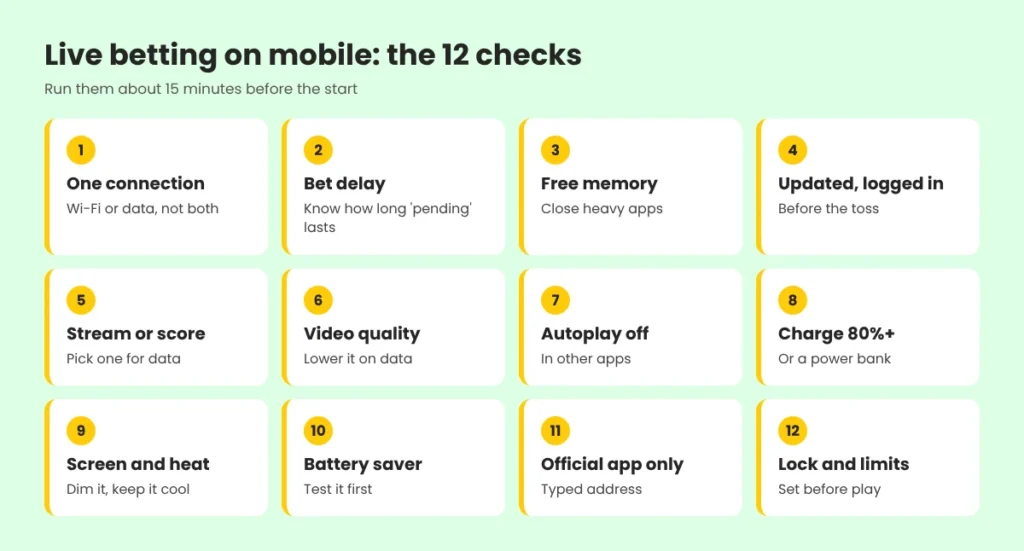
This checklist covers those three things plus safety. None of it changes the odds or your chances. It decides whether you get the bet you meant, at the price you saw.
When to run this checklist
Run it about 15 minutes before a match you plan to bet on in-play, and again whenever an app keeps logging you out or rejecting bets. It takes five minutes once you know it. If you are new to in-play markets, read our guide to what live betting is and how in-play prices move first.
Speed checks
1. One strong connection, not two
Why it matters: when a phone hops from Wi-Fi to mobile data mid-match, the app often has to reconnect, and sometimes log you in again. A bet sent during that hop can fail.
How to check it: choose either strong Wi-Fi or a strong 4G or 5G signal and stay on it. If you are using data, turn Wi-Fi off so the phone does not jump to a weak network. Avoid betting in-play from a moving train or car.
2. You know the bet delay
Why it matters: most sites hold an in-play bet for a few seconds before accepting it. If the price moves or the market is suspended in that window, the bet can be rejected.
How to check it: before the match, place the smallest stake the site allows on a pre-match market and watch how long the slip stays pending. Read the live rules once so a suspension does not surprise you.
3. Free memory and background apps
Why it matters: a phone short on memory may reload the betting app every time you switch back from WhatsApp or a stream, and a reload mid-over costs you seconds.
How to check it: close games, camera and video apps you are not using. Use either the app or the mobile site, not both, because two sessions on one account can cause logouts.
4. Updated and logged in before the toss
Why it matters: an update or OTP request during a close finish is the worst time to be locked out.
How to check it: update the app, log in, complete any OTP step and check your balance before play starts.
Data checks
5. Stream or scorecard: pick one
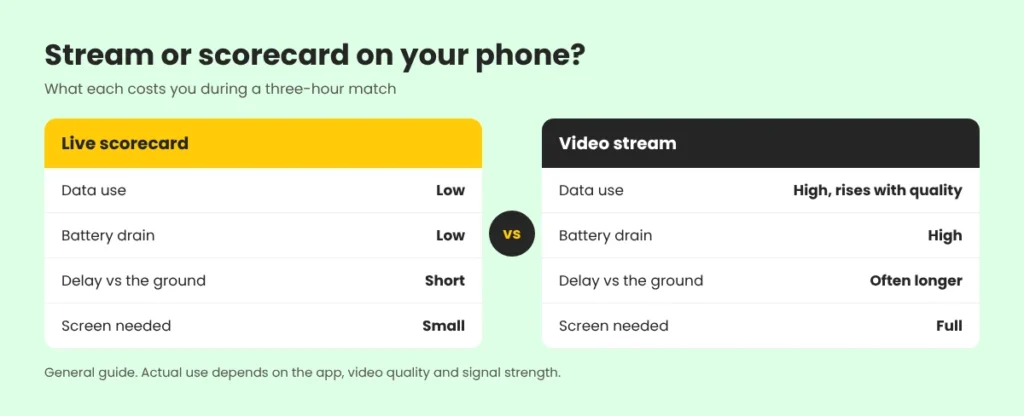
Why it matters: video is the biggest data cost by far. Streaming media sends a continuous flow of video, while a betting app mostly sends small updates of prices and scores. HD video can use around a gigabyte or more an hour, so a full T20 stream can eat most of a 1.5 GB or 2 GB daily pack.
How to check it: look at your data usage screen after one match to see what the betting app and the stream each used. If your pack is small, follow a live scorecard on the phone and watch the broadcast on a television.
6. Lower video quality on mobile data
Why it matters: quality is the main lever on data use, and a phone screen rarely needs the highest setting.
How to check it: set the streaming app to a lower quality when you are on mobile data.
7. Autoplay and background updates off
Why it matters: other apps auto-playing videos or downloading updates compete with your betting app for the same connection.
How to check it: pause automatic app updates and turn off video autoplay in social apps for the duration of the match.
Battery checks
8. At least 80% at the start
Why it matters: a T20 runs for more than three hours and a football match close to two with half-time. Streaming and a weak signal both drain a battery quickly.
How to check it: charge to 80% or more before the start, or keep a charger or power bank within reach.
9. Screen brightness and heat
Why it matters: the screen is a major drain, and a phone that gets hot slows itself down.
How to check it: lower brightness to what you can still read comfortably. If the phone feels hot, take it out of a tight case and keep it out of direct sun.
10. Battery saver tested in advance
Why it matters: battery saver modes can limit background refresh, which may delay price updates or log you out.
How to check it: turn battery saver on during a quiet pre-match period and see whether prices still refresh normally. Only rely on it in a live match if they do.
Safety checks
11. App from an official address only
Why it matters: many betting apps are APK files installed from a website, which makes look-alike downloads a real risk. Searches for familiar names such as Vikrant Exchange or vikrantexch often turn up copied pages.
How to check it: type the address yourself or use a bookmark. Android APK downloads in this group are offered only by ve567.live, wfix.vip and autoexch.live; our AutoExch page explains that option. vikrant247.com, ve777.club and wfix.fun work in the mobile or desktop browser only, with no app, so an “app” for any of them sent in a chat is not genuine.
12. Permissions, screen lock and limits
Why it matters: a betting app has no reason to read your SMS or contacts, and a shared phone or one without a screen lock puts your balance at risk. Limits work best when they are set before the excitement starts.
How to check it: refuse SMS and contact permissions, use a screen lock, log out after each session on a shared phone, and set your stake size and deposit limit for the day before the first ball.
How to read your result
- All 12 ticked: your phone is ready for live betting.
- A speed check failed: do not bet in-play on that connection. Place pre-match bets instead, or wait until you have a strong signal.
- A data or battery check failed: switch to the scorecard and keep the charger close.
- A safety check failed: stop and fix it first. Uninstall any app you are unsure of and reinstall from an official address.
The same checks help you compare the best mobile bookmakers. Lists of top mobile betting sites rarely test how an app behaves through a full match, so run the checklist with small stakes and judge each mobile betting site on what you see: how quickly odds update, how clearly suspensions show, and whether you stay logged in to the last over. The best live betting app for you is the one that passes on your phone and your connection. Whether you start from Win Fix or anywhere else, our guide to the best live betting platform in India covers what to look for beyond the phone.
Before you play
Betting and real-money games are for adults aged 18 and over. Set a budget you can afford to lose, and use deposit limits and time-outs if you play more than you planned. India’s Promotion and Regulation of Online Gaming Act, 2025 and its 2026 rules affect real-money online games, and state laws differ, so check the laws that apply where you live.